Crawl website
Crawling your website is an important step in ensuring Rek.ai has the most up-to-date information about your content, especially useful after you've made significant changes to your website or added new content. Rek.ai normally crawls your website automatically every 2–12 hours, but you can manually trigger a crawl whenever you need to.
In the Rek.ai dashboard:
- Go to the "Settings" tab of your project.
- Click the "Re-index site" button.
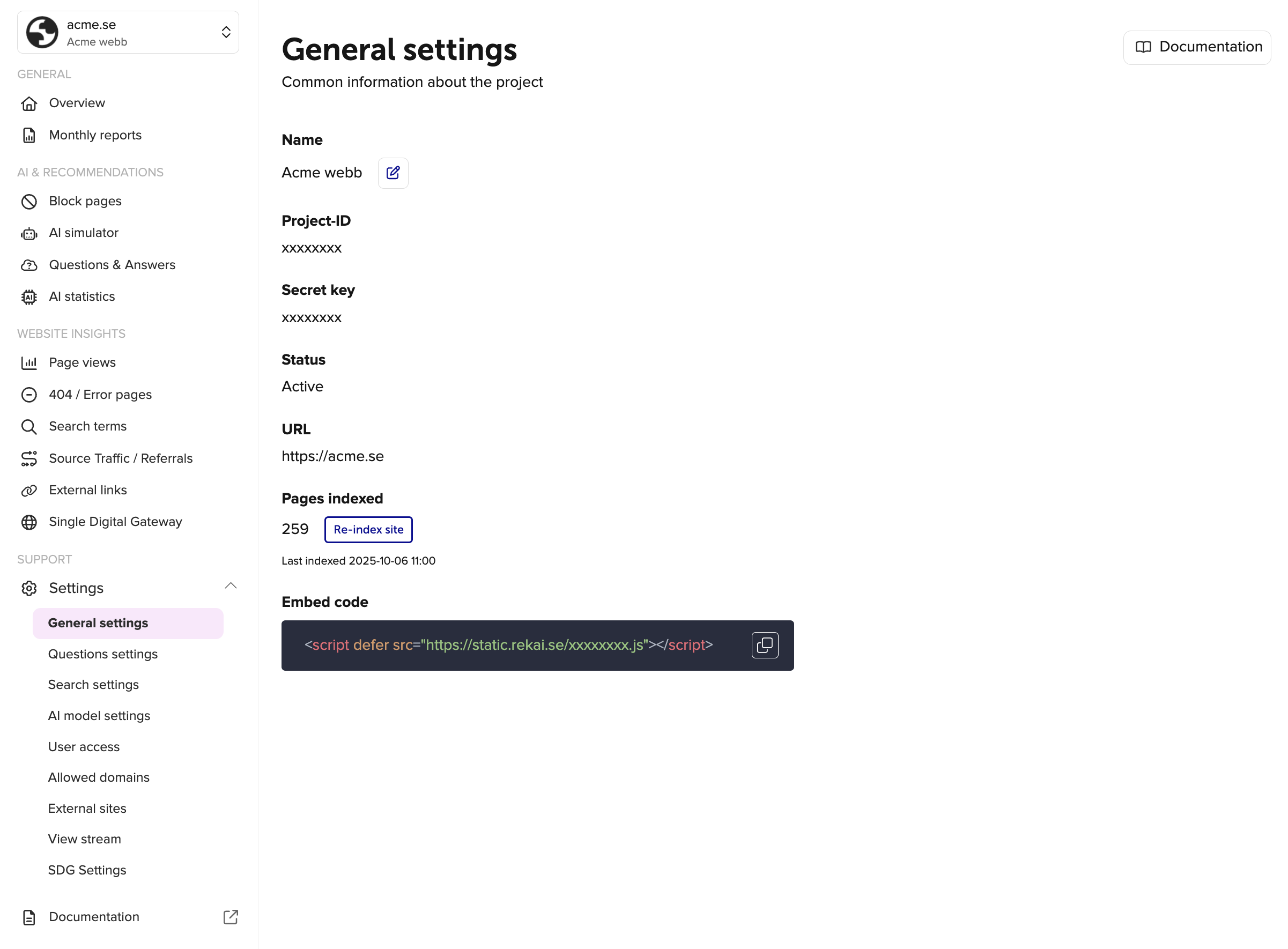
Via the API
You can also start a crawl from your own systems, for example from a deploy pipeline or a CMS publish hook, by calling the crawl endpoint for your project:
https://admin.rek.ai/crawl/:idReplace :id with your project ID and send your project's secret key in the rek-secret header. You find both the project ID and the secret key under "Settings" in the Dashboard (opens in a new tab).
curl https://admin.rek.ai/crawl/YOUR_PROJECT_ID \
-H "rek-secret: YOUR_SECRET_KEY"The secret key gives access to your project. Only call this endpoint from a server and never expose the secret key in a browser or in public code.
IP addresses and user agent
RekAiBot is the web crawler operated by Sandskogen AI Aktiebolag, Sweden. It reads the content of websites that use Rek.ai so that we can deliver relevant recommendations and search results to their visitors.
If you found this page from your server logs, the short version is this: we only crawl websites that belong to our customers, we visit at most one page per second, and you can stop us at any time through robots.txt or by contacting us.
You can also read about the crawler on rek.ai/bot (opens in a new tab).
Why is RekAiBot visiting my site?
RekAiBot only crawls websites owned by organisations that have an agreement with Rek.ai. It does not crawl the open web and it does not follow links to external sites.
If your organisation uses Rek.ai, the crawler is there because you or a colleague set it up. It reads your pages so that our recommendation and search features can suggest the right content to your visitors.
If your organisation does not use Rek.ai and you still see RekAiBot in your logs, something is wrong. Please contact us and we will look into it right away.
How to identify RekAiBot
Requests from RekAiBot carry this user agent string:
Mozilla/5.0 AppleWebKit/537.36 (KHTML, like Gecko); compatible; Rekai-Bot/1.0; +https://rek.ai/All requests come from a fixed set of IP addresses:
91.106.198.7
91.123.202.104
Anyone can spoof a user agent string. If you want to be sure a request is from us, check the source IP against the list above.
How RekAiBot crawls
Rate. RekAiBot makes at most one request per second to a given website.
Content. The crawler fetches HTML pages and follows internal links on the site it has been set up for.
Frequency. How often a page is revisited depends on the setup for each customer site. You can also trigger a new crawl manually, see Crawl website.
robots.txt. RekAiBot follows robots.txt rules that are addressed to it by name, using the token RekAiBot. It does not follow rules in the wildcard group User-agent: *. Many of our customers use the wildcard group to keep pages out of public search engines while still wanting those pages to appear in their own site search and recommendations. Addressing RekAiBot by name lets you control our crawler without changing how your site appears anywhere else.
Allow RekAiBot through a firewall
If your website is protected by a firewall, a WAF (Web Application Firewall), a CDN with bot protection or an IP restriction, make sure both IP addresses above are allowed. Otherwise RekAiBot cannot read your pages, and recommendations and search will not be updated.
The IP addresses above are only used by RekAiBot. The Rek.ai script on your website runs in your visitors' browsers, so those requests come from your visitors and not from these IP addresses. To allow the script itself, see Content Security Policy (CSP).
How to control or stop RekAiBot
To block RekAiBot from your whole site, add this to your robots.txt:
User-agent: RekAiBot
Disallow: /
To keep RekAiBot out of a specific section:
User-agent: RekAiBot
Disallow: /internal/
Changes to robots.txt are picked up the next time we visit your site. If you need crawling stopped sooner, or if robots.txt is not an option for you, email us at bot@rek.ai and we will stop within one business day.
You can also block the IP addresses listed above in your firewall.
Blocking RekAiBot in any of these ways will stop recommendations and search from updating on your site.
What we do with the content
Content fetched by RekAiBot is used only to power recommendations and search on the website it was collected from. We do not sell it, share it with third parties, or use it to train general purpose AI models.
For details on how we store and protect data, see our Security (opens in a new tab) and Privacy Policy (opens in a new tab) pages.
Contact
Questions or concerns about RekAiBot? Email bot@rek.ai.
If you are reporting unexpected traffic, please include the domain, the time of the requests, the source IP address and the user agent string you saw. That helps us find the cause quickly.