Autocomplete Sitevision
Features
- Displays suggestions to end-users as they type
- Shows top suggestion as a hint (i.e. background text)
Sitevision module
If you're using the Sitevision module, see this link (opens in a new tab) for more information.
Installation
The sv-autocomplete.min.js library must be included after the Rek.ai base script.
<script src="https://static.rekai.se/files/sv-autocomplete.min.js"></script>Usage
Step 1
Include https://static.rekai.se/files/sv-autocomplete.min.js.
Step 2
Initialize the auto-completion by calling the rekai_autocomplete function, adding the selector for a search box already on the template:
<script src="https://static.rekai.se/files/sv-autocomplete.min.js"></script>

<script>
  svDocReady(function() {
      $svjq(".sv-searchform-portlet input[name='query']").rekAutoComplete();
  });
</script>
Filtering and scoping results
Only show search results from pages in the same language as the current one
In this example, we retrieve the language of the current page and use it as a filter when displaying the search suggestions. In the example, we also add Questions & Answers to the result.
<script src="https://static.rekai.se/files/sv-autocomplete.min.js"></script>
<script>
  svDocReady(function() {

    // START SITEVISION
    var allowedlangs = document.documentElement.lang || 'se';
    $svjq(".sv-searchform-portlet input[name='query']").rekAutoComplete({
      params: {
        allowedlangs: allowedlangs,
        entitytype: 'all', // Also questions
      },
      sendToTarget: true // Click sends to target page
    });
  });
</script>
Search only in a part of a site
To search various sections of the site from different areas of your website, you can dynamically determine the subtree.
<script src="https://static.rekai.se/files/sv-autocomplete.min.js"></script>
<script>
  svDocReady(function() {
    var subtree = '';
    var href = window.location.href;

    if(href.indexOf('/english') > -1) {
      subtree = '/english';
    }
    else if(href.indexOf('/swedish') > -1) {
      subtree = '/studentwebb';
    }

    $svjq(".sv-searchform-portlet input[name='query']").rekAutoComplete({ // ID for the search input field
      params: {
        subtree: subtree
      },
      sendToTarget: true // Click sends to target page
    });
  });
</script>
Restrict a search box to e-services only
You can create a dedicated search box for e-services by specifying the external domain in the domain parameter.
<script src="https://static.rekai.se/files/sv-autocomplete.min.js"></script>
<script>
  svDocReady(function() {
    $svjq(".sv-searchform-portlet input[name='query']").rekAutoComplete({ // ID for the search input field
      params: {
        domain: 'fagerstawebservice'
      },
      sendToTarget: true // Click sends to target page
    });
  });
</script>
Parameters to control autocomplete in Sitevision
You can enhance the autocomplete feature in Sitevision by adding specific parameters during initialization. Add these parameters under the params object.
Here's an example of initializing autocomplete with rootpathlevel:
<script src="https://static.rekai.se/files/sv-autocomplete.min.js"></script>
<script>
   svDocReady(function() {
       $svjq(".sv-searchform-portlet input[name='query']").rekAutoComplete({
          params: {
            userootpath: true,
            rootpathlevel: 1
          },
          sendToTarget: true // Click sends to target page
       });
   });
</script>
Or, to return all collected data (including JSON-LD) within a subtree:
<script src="https://static.rekai.se/files/sv-autocomplete.min.js"></script>
<script>
    svDocReady(function() {
      $svjq(".sv-searchform-portlet input[name='query']").rekAutoComplete({
        params: {
          addcontent: true,
          subtree: 'news'
        },
        sendToTarget: true // Click sends to target page
      });
    });
</script>
The available settings are:
<script src="https://static.rekai.se/files/sv-autocomplete.min.js"></script>
<script>
   svDocReady(function() {
       $svjq(".sv-searchform-portlet input[name='query']").rekAutoComplete({
           cssClasses: {
               resultList: 'sv-autocomplete-search-result',
               resultItem: 'sv-autocomplete-result-item',
               activeResultItem: 'sv-autocomplete-result-item-active'
           },
           appendTo: 'body',
           queryParameterName: 'term',
           delay: 200,
           cacheTTL: 300000,
           source: source,
           minLength: 2,
           params: {
               // Here all parameters added to a prediction div can be added. Such as subtree or lang
               subtree: 'news'
           },
           sendToTarget: true, //Send directly to target page instead of search results page,
           userootpath: false,
           rootpathlevel: 1 // Same as for a prediction
       });
   });
</script>
All the data parameters that can be added to a rek-prediction div can also be added to autocomplete, nested inside a params object:
<script src="https://static.rekai.se/files/sv-autocomplete.min.js"></script>
<script>
  svDocReady(function() {
    $svjq(".sv-searchform-portlet input[name='query']").rekAutoComplete({
      params: {
        subtree: '/myeservices'
      },
      sendToTarget: true // Click sends to target page
    });
  });
</script>
Customizing rendering and behavior
Direct the user to the target page on selection
When a search result links to an external URL, such as an e-service, the system automatically opens the link in a new window.
If you'd like to enhance the link, for example by adding your own icon, you can do so by creating CSS rules for the class automatically assigned to external links.
<script src="https://static.rekai.se/files/sv-autocomplete.min.js"></script>
<script>
  svDocReady(function() {
    $svjq(".sv-searchform-portlet input[name='query']").rekAutoComplete({ // ID for the search input field
      sendToTarget: true
    });
  });
</script>
Function to run before autocomplete runs
You can register a custom function that runs before autocomplete is sent to the backend.
function customAutocompleteTransform(tempSource){
   return tempSource + '&foo=bar';
}
window.__rekai.customAutocompleteTransform = customAutocompleteTransform;
Override rendering of the autocomplete, open external links in same window
By adding your own function for rendering, you can give your suggestions unique appearances depending on, for example, the URL.
If you don't want external links to open in a new window, you can override the render function to generate the same code for all links:
<script src="https://static.rekai.se/files/sv-autocomplete.min.js"></script>
<script>
  // This function name is use when rendering a result
  window.rekaiSVAutoRenderItem = function(prediction) {
    return '<li class="normal" data-targeturl="' + prediction.url + '" ><a href="#">' + escapeHTML(prediction.title) + '</a></li>';
  }
  </script>
Or you can even create your own style of autocomplete:
<script src="https://static.rekai.se/files/sv-autocomplete.min.js"></script>
<script>
   // This function name is use when rendering a result
   window.rekaiSVAutoRenderItem = function(prediction) {
        var value = prediction.title;

        try {
           if(this.options.sendToTarget) {
              // When sending directly to target, it must have a url
              if(prediction.pages == '') {
                 return '';
              }
           }
        }
        catch(It is) { return '';}

        if(value.indexOf('?') > -1) {
           // For SV insert slash before ?
           value = value.replace(/\?/ig, '\\?');
        }


        var url = prediction.url;
        // If external domain
        if(url.indexOf('http') > -1) {
           var tempLink = "'" + url + "'";
           var blank = "'_blank'";
           var externaltag = '<img alt="" src="/sitevision/util/images/externallink.png" class="sv-linkicon" styel="max-height: 10px;max-width: 10px;">';
           return '<li class="' + this.getCssClass('resultItem') + ' externalAutoClass"><a href="#" onclick="window.open(' + tempLink + ', ' + blank + ');">' + window.escapeHTML(value) + externaltag + '</a></li>';
        }
        else {
           return '<li class="' + this.getCssClass('resultItem') + '" data-targeturl="' + url + '" ><a href="#">' + window.escapeHTML(value) + '</a></li>';
        }
     }
</script>
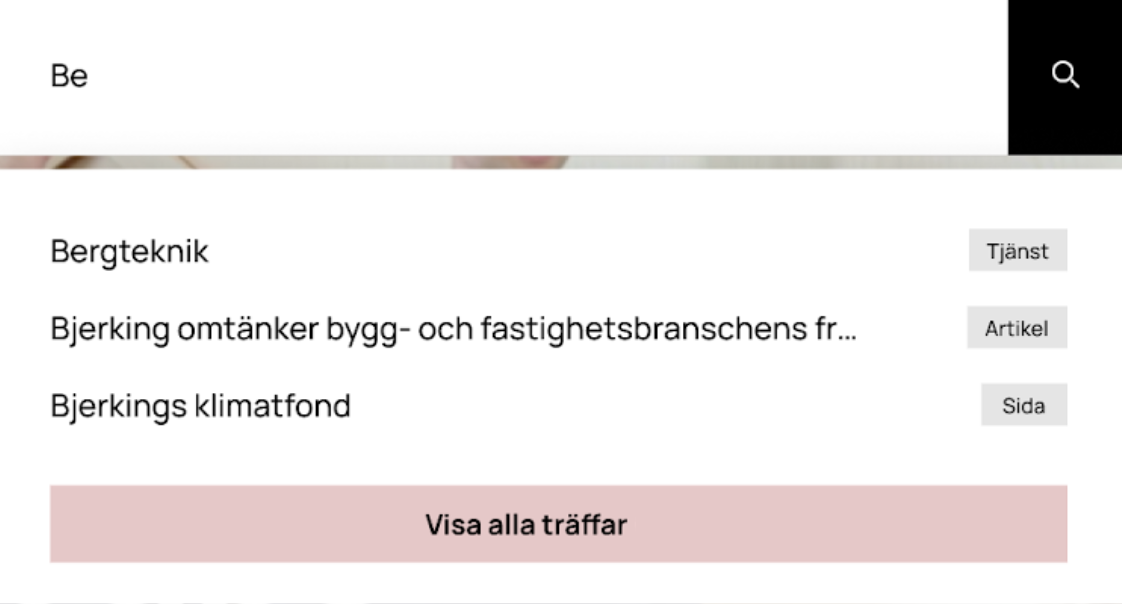
Add one last selection to autocomplete
If you wish to include a permanent option in the search suggestions, you can do so by overriding a specific function that adds a final choice to the list. This can be particularly useful if you desire to have an option that displays all search results on the results page.
<script src="https://static.rekai.se/files/sv-autocomplete.min.js"></script>
<script>
   function submitForm() {
      // Get the form by its action attribute
      var form = document.querySelector('form[action="/ovrigt/sokresultat"]');

      // Submit the form if it exists
      if (form) {
         form.submit();
      }
   }

   window.rekaiSVAutoRenderFinalItem = function(query) {
      return '<li class="sv-autocomplete-result-item"><a href="#" onclick="submitForm(); return false;">Visa alla träffar</a></li>';
   }
</script>
Add tags to different pages in the autocomplete
  <style>
    li.sv-autocomplete-result-item {
      position: relative;
    }

    li.sv-autocomplete-result-item:after {
      font-size: 13px;
      color: #777;
      position: absolute;
      right: 9px;
      top: 9px;
      border-radius: 200px;
      background-color: #e9cecf;
      padding: 0 6px;
    }


    li.tag-article:after {
      content: "Artikel";
    }

    li.tag-tjanster:after {
      content: "Tjänster";
    }

    li.tag-sida:after {
      content: "Sida";
    }

  </style>

  <script>
    window.rekaiSVAutoRenderItem = function (prediction) {
      var tagClass = '';
      var url =  prediction.url;

      if(url.indexOf('artikel') > -1) {
          tagClass = 'use-tag tag-article';
      }
      else if(url.indexOf('tjanster') > -1) {
          tagClass = 'use-tag  tag-tjanster';
      }
      else {
          tagClass = 'use-tag  tag-sida';
      }

      return '<li class="sv-autocomplete-result-item ' + tagClass + '" data-targeturl="' + url + '" ><a href="#">' + escapeHTML(prediction.title) + '</a></li>';
  }
  </script>
See also: Add a header before the questions in autocomplete (opens in a new tab).
Sort autocomplete into "groupings"
If you want the autocomplete to be grouped, there is a sorting function that runs when it exists. In it, you can choose how they should be grouped.
In the example below, you want to sort the results into first all programs and then all courses.
<script src="https://static.rekai.se/files/sv-autocomplete.min.js"></script>
<script>
  // Custom function for sorting result before printing it to the search result
  window.sortResult = function(result, options) {
    // In the options object you can see and add parameters when initilizing the autocomplete. So you can for example add a parameter "groupby" and then check for it here and sort in different ways depending on the value of it.
    options = options || {};
    options.params = options.params || {};

     var course = [];
     var program = [];

     for(var i = 0; i < result.length; i++) {
        if(result[i].url.indexOf('courses') > -1) {
           course.push(result[i]); // Add to course array
        }
        else {
           program.push(result[i]); // Add to program array
        }
     }

     result = program; // First programs
     result = result.concat(course); // Then courses
     return result; // return concatenated array
  }

  svDocReady(function() { // Page has loaded
     $svjq(".hh-search__input-field").rekAutoComplete({ // Init autocomplete
        params: {
          subtree: 'education/programme, education/courses', // Only pages sith this in the url
          nrofhits: '15', // Nr of hits
          maxpathdepth: '3' // Only att this level in the structure
       },
       sendToTarget: true // Click on result shall go directly to the page
     });
  });
</script>